


Imagine the standard networking scene at a conference: attendees holding their name badges, chatting awkwardly, and unsure of who they are speaking to. The most interesting discussions are taking place online, where attendees exchange opinions, images, and reactions, but the larger event community is unable to see these digital exchanges.This dynamic is completely changed by social aggregation.
By displaying genuine user-generated content (UGC) from attendees, these aggregated feeds turn individual posts into potent networking stimuli. By combining content from multiple social media platforms into cohesive, real-time feeds, event planners can create spaces where visitors’ opinions are respected and real connections are made.
This article explores how social aggregation fosters meaningful networking among attendees, shares proven implementation strategies, and demonstrates how to turn event attendees into engaged, visible contributors to a shared community experience.
Social aggregation is the process of compiling and showcasing content from multiple social media platforms in a single feed, which is then uploaded simultaneously. This content can be displayed on screens throughout an event space and added to websites, apps, and digital and physical spaces. Social aggregation allows users to add their content to digital and physical spaces, display it on screens throughout an event space, and integrate it into apps or websites.
By integrating content from multiple social media platforms, including Facebook, Instagram, LinkedIn, TikTok, and X (formerly Twitter), event planners can produce a branded experience. This is made possible by platforms like Walls.io that specialize in this type of integration. As a result, genuine UGC is continuously produced, boosting attendance and fostering confidence. Similar to a modern community board, users can find others who share their interests, see people who look like them, and engage in impromptu, unplanned conversations in this shared digital space.
Social aggregation has power because it makes networking visible and participatory. Networking becomes a shared experience that anyone can observe and participate in, rather than taking place in separate areas throughout your venue. This makes it easier for shy people to connect with others.
It takes less than 5 minutes
Key advantages for event networking:
- Encourages attendees to post more content and tag your event
- Highlights the opinions of attendees and promotes genuine UGC that fosters trust in the community.
- Helps both in-person and virtual visitors to feel included in the same discussion
- Creates organic icebreakers and recognition moments
- Provides conversation starters based on shared interests and experiences
- Turns attendees into content producers, producing genuine user-generated content for upcoming promotions.
- Automatically selects excellent user-generated content while upholding brand standards.
⭐️ Related: How to Combine Event Content in One Display with Multi Hashtag Aggregation
Use cases for attendee networking
Here are four proven ways event planners can leverage social aggregation to promote meaningful peer-to-peer connections:
1. Hashtag networking walls

Use a specific event hashtag to drive a live social wall that produces insightful UGC as attendees commemorate special occasions, exchange ideas, and highlight new connections. In high-traffic areas like lounges and registration areas, as well as close to main stages, display these posts on screens.
To maximize visibility and discoverability, consider using both a primary event hashtag (e.g., #YourEvent2024) and secondary hashtags for specific tracks or communities (e.g., #YourEventMarketing, #YourEventFounders).
The team at Atlassian used a multi-hashtag aggregation strategy to segment audience content by session, speaker, or theme. By collecting multiple hashtags into one display and enabling viewers to filter by topic, they created a more personalized attendee experience and made it easier for attendees to discover relevant peers to connect with.
⭐️ Related: Sports Marketing Examples
2. Direct posts for privacy and inclusion
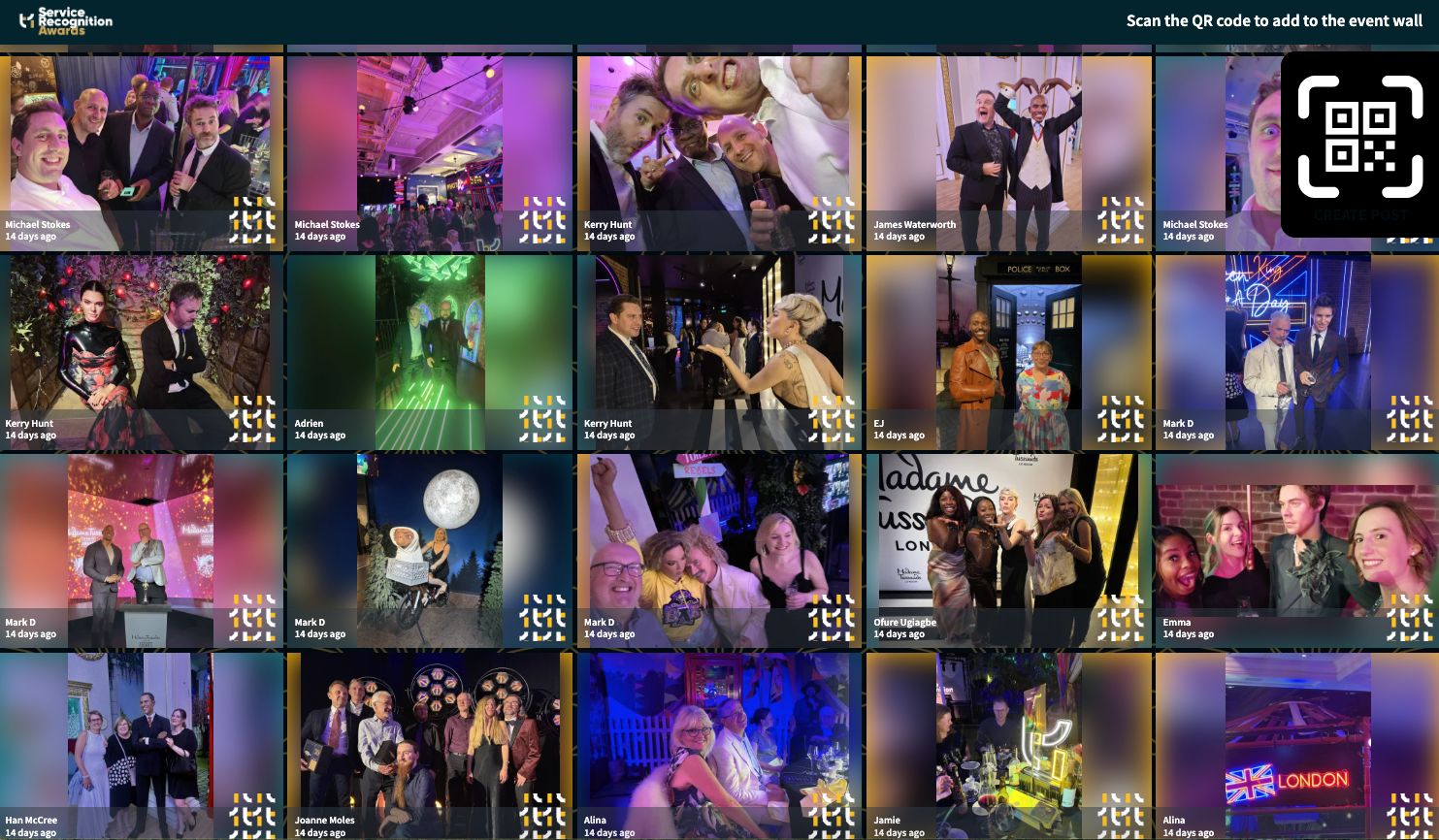
Not all attendees use social media and even among those who do, many prefer not to mix personal and professional identities in public channels. To increase inclusion and reduce participation barriers, platforms like Walls.io offer Direct Posts, which allow attendees to upload content directly to a social wall using a link or QR code, no social account required.
6Connex describes the advantages of alternate upload choices, such as Direct Posts, for virtual and hybrid events. Participants don’t need to sign in to a third-party platform in order to submit questions, comments, or images. This is particularly useful for audiences who are privacy conscious or for internal company events where social interaction isn’t guaranteed.
3. Interest-based content zones
For larger or multi-track events, we recommend creating multiple content streams tailored to different attendee demographics. Use topic-specific hashtags or wall filters to find posts relevant to sponsors, breakout session participants, or first-time attendees.
In our guide to multi-hashtag aggregation, we show how organizers can use session-specific hashtags, sponsor identifiers, or community labels to build focused content zones. These segmented feeds let attendees engage around shared interests while still contributing to the broader event experience.
4. Speaker and attendee Q&A integration
Convert conventional Q&A sessions into interactive networking opportunities by gathering queries and feedback from direct submissions as well as social media. To allow both in-person and remote attendees to interact with speakers in real time, show a selection of content live during sessions.
6Connex notes that integrating social media walls into keynotes and panels creates a two-way conversation that includes remote attendees. Walls.io’s embeddable wall can surface attendee-submitted questions during sessions, whether posted on social media or uploaded directly making live Q&A feel inclusive and immediate for everyone in the room (and beyond).
Try Walls.io
You’ll thank me later
Step-by-step implementation guide
Launching social aggregation for networking requires strategic planning and clear execution. Here’s a comprehensive roadmap:
Step 1: Define your hashtag strategy and content zones
Create a unique, memorable, and easy-to-spell primary event hashtag first. Test it on different platforms to make sure it isn’t already in use. Next, make secondary hashtags for specific goals. #YourEventName2024 could be your main hashtag, and #YourEventConnects could be your networking hashtag. Use hashtags such as #YourEventKeynote or #YourEventWorkshops for sessions, and #YourEventStartups or #YourEventWomen for particular communities.
⭐️ Related: Event Hashtag Strategy Guide
Select a platform, such as Walls.io, that offers a wide range of social media aggregation features. Configure your wall to retrieve content from Facebook, Instagram, LinkedIn, TikTok, X, and direct uploads. To match the branding of your event, change the design’s colors, typefaces, and logo placement. Verify that your platform allows for real-time content updates, test display formats in various screen sizes and orientations, and set up moderation filters to preserve the quality of the content.
Step 3: Create multiple display touchpoints
Display your social wall at multiple event touchpoints to optimize networking impact. Large screens should be positioned before and after main sessions. Digital signage should be placed in hallways, lounges, and registration areas. Smaller screens should be added to coffee stations and networking bars. Mobile displays that can be moved to different locations should also be taken into consideration. Create specialized microsites for various networking communities, incorporate feeds into virtual event platforms, and incorporate walls into the networking section of your event app.
Step 4: Promote participation strategically
Clear calls to action and constant promotion are necessary for social aggregation to be successful. Create social media templates that attendees can personalize, incorporate hashtags into all event communications prior to the event, and send out participation instructions along with registration confirmations. Put QR codes for Direct Posts on programs, lanyards, and table tents during the event. Use emcees to encourage participation on a regular basis, have speakers use hashtags during presentations, and provide rewards for featured posts, such as prize drawings.
Step 5: Moderate and amplify strategically
Don’t rely entirely on automation; use AI moderation tools to automatically filter inappropriate content. Assign team members to keep an eye on content and draw attention to outstanding posts by highlighting them in announcements or pinning them to the top of feeds. Establish procedures for approving sensitive content, create keyword filters to safeguard your brand, set up escalation protocols for posts that cause problems, and train staff on community guidelines and response techniques.
Integrating social aggregation into your networking strategy delivers both immediate engagement benefits and long-term marketing value that extends well beyond your event dates.
Immediate Engagement Benefits
Events using social aggregation platforms report two to three times as much attendee-generated content as those using traditional networking techniques. Because more people are participating, there are more chances for attendees to join in the community discussion, and the event atmosphere is livelier. When attendees see their content highlighted prominently, it creates a sense of community and recognition that is hard to achieve on a large scale with traditional networking techniques. Social walls ensure that attendees who are far away don’t feel excluded from networking opportunities by fostering shared experiences and bridging the gap between virtual and in-person attendees.
Long-Term Marketing Value
The marketing advantages go well beyond the actual event. The impact of your event extends beyond the immediate participant pool when attendees’ professional networks see content that has been tagged at the event. With the help of social aggregation platforms, you can plan when sponsored or branded content will show up in your feeds, generating extra income while preserving genuine community involvement. The content repository you build is arguably the most valuable; carefully chosen posts from your social walls can be used to create marketing materials for upcoming events, social media campaigns, and post-event recap videos, providing you with a long-term return on your networking investment.
Measurable ROI indicators
- Engagement metrics: Track post volume, hashtag reach, and social wall interaction rates.
- Networking quality: Ask attendees about follow-up rates and connection quality.
- Content longevity: Calculate the amount of time that event-generated content stays in circulation.
- Sponsor satisfaction: Record the frequency of sponsor mentions and engagement rates to gauge sponsor satisfaction.
Weak hashtag promotion strategy
The problem: Creating great hashtags but failing to communicate them effectively means missed networking opportunities and low participation rates.
The solution: Include hashtag promotion in all of your event communications. To guarantee consistent messaging, use verbal announcements, slides, signage, and staff training. Make hashtags visible on all of your venue’s digital displays, programs, and name badges.
Insufficient content moderation
The problem: Unfiltered social feeds can display inappropriate content, off-topic posts, or competitor mentions that detract from your networking goals.
The solution: Put in place both manual approval procedures and AI moderation. Install sentiment analysis tools, keyword filters, and swear blockers, but always keep human moderators on hand to make thoughtful judgments about content that crosses the line.
The problem: Focusing only on Instagram, Facebook, or LinkedIn excludes attendees who don’t actively use these platforms or prefer not to post publicly.
The solution: Provide options for direct posting that don’t require social media accounts at all times. Regardless of attendees’ social media preferences, use QR codes and easy upload forms to collect content from them.
Making content feel too corporate
The problem: Over-moderating or pushing branded content too aggressively can make your social wall feel like a marketing channel rather than a genuine networking space.
The solution: Prioritize enhancing real attendee voices over corporate messaging. Make sure your branded content is relevant and valuable rather than just promotional when you do use it.
Automate content workflows
Use native APIs to route social wall content into other marketing channels or integrate your social aggregation platform with Zapier or similar tools. Top posts may be pulled into newsletters sent out after an event, or featured posts may be automatically pushed to your CRM for follow-up campaigns. Create workflows that automatically select posts with high engagement, create templates for channel-specific social content adaptation, and configure data export procedures for continuous content strategy.
Gamify participation with interactive features
Viewers can now become attendees by using the reactions, voting, and commenting features found on the majority of social aggregation platforms. These tools are ideal for networking competitions or challenges that encourage greater participation. Use reaction buttons to allow attendees to vote for their favorite content, hold “Post of the Day” competitions with small prizes, and have them reply to each other’s posts directly on the wall.
Personalize experiences for different audiences
Create distinct social wall experiences for each group of attendees. Set up virtual networking areas with their own social streams, run separate walls for remote and in-person audiences, and share content across feeds to connect both audiences for hybrid events. Create walls devoted to particular professional tracks for large conferences, keep content for new and returning attendees separate, and arrange attendees by location for networking in the area.
Leverage analytics for continuous improvement
To find out which screen locations, hashtags, and content promote networking the most, check your platform’s analytics. It’s worth keeping tabs on how various platforms and content kinds perform, when people post most frequently and how that fits into your schedule, where attendees are coming from (particularly for hybrid events), and which hashtags trend the most on various platforms.
Insperity: Connecting 4,500 employees across multiple locations
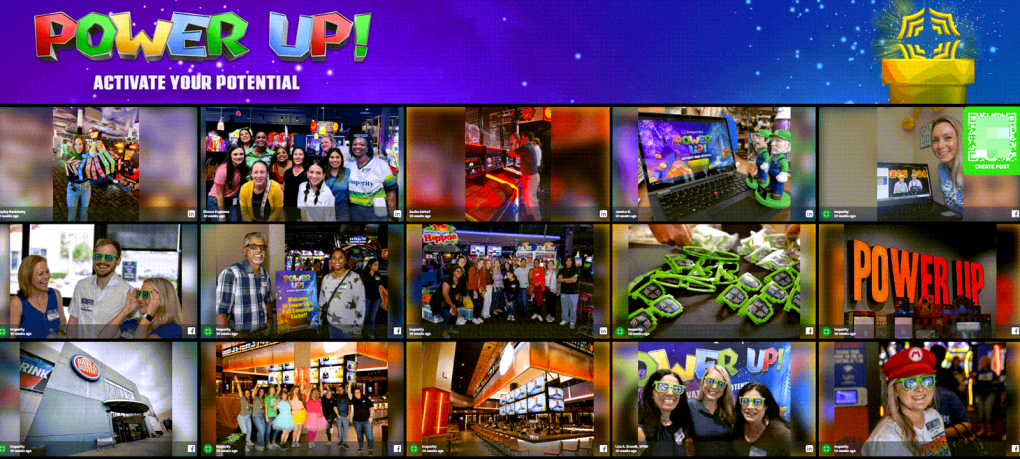
During their internal events, Insperity, a top provider of HR services, had to connect 4,500 workers from various office locations. Remote workers felt cut off from the company culture and had fewer opportunities for in-person interactions thanks to traditional networking techniques.
Implementation strategy: Their approach focused on social walls with a strong emphasis on Direct Posts, which enables staff members to participate without utilizing personal social media accounts. This is essential for upholding professional boundaries. By being integrated into their company intranet and shown on internal screens, the social walls provided ongoing networking opportunities outside of scheduled events.
Results: The implementation resulted in increased cross-departmental connections, sustained engagement with company culture initiatives, and significantly higher participation from remote employees. For privacy-conscious workers who wished to engage in business networking without combining their personal and professional social media presences, the Direct Posts feature proved especially helpful.
Key takeaway: Direct Posts functionality removes barriers for professional networking, making participation accessible regardless of personal social media preferences.
Building community, not just content
Rather than when opportunities are created, effective networking occurs when people feel heard, seen, and a part of something bigger than themselves. Social aggregation turns attendees into contributors by elevating their voices and making participation feel visible, valued, and shared.
Effective event coordinators are aware that combining digital and real-world experiences is necessary for contemporary networking. You can create environments where genuine connections occur organically, timid guests gain confidence, and the excitement of one-on-one conversations spreads throughout your event community by carefully selecting social media content.
The technology is available, the strategies have been tried, and the attendees are ready to participate. More important than whether social aggregation can improve your event networking is how fast you can begin building the connected communities your attendees truly want to be a part of.
Think about adding a social wall to your next event to make networking more personal, engaging, and genuinely unforgettable for every visitor.
It’s quick and hassle-free!
Frequently asked questions
Q: What’s the best location to display social walls for maximum networking impact? Displays should be put in places where people congregate and wait naturally, such as outside session rooms, networking bars, break areas, and main lobbies. Include feeds prominently in mobile apps and virtual platforms for hybrid events.
Q: How do I encourage participation from attendees who don’t use social media? Direct Posts features are essential. Use QR codes that allow anyone to upload content without accounts. Place these prominently on table tents, name badge lanyards, and program materials.
Q: Can social walls work effectively for smaller events? Absolutely. Even 50-person workshops benefit from shared digital community spaces. Smaller events often see higher participation rates because every contribution feels more significant.
Q: Which social media platforms should I prioritize for professional events? Start with LinkedIn, which is the go-to platform for professional networking and thought leadership. Instagram and Facebook are great for visual engagement, while TikTok may help expand reach to younger demographics. Always provide Direct Posts for platform-neutral content sharing to guarantee that everyone can take part, regardless of platform.
Q: How do I prevent inappropriate content from appearing on displays? Enable AI moderation to filter spam and negative sentiment automatically. Set up keyword filters and manual approval workflows. Train staff on escalation procedures for problematic content.
Q: What’s the ideal number of hashtags for an event networking campaign? For particular tracks or communities, use two to four secondary hashtags in addition to the main event hashtag. Too few hashtags restrict conversation segmentation, while too many hashtags dilute participation.
Q: How can I measure the ROI of social aggregation for networking? Track metrics like post volume, hashtag reach, attendee satisfaction scores, documented business connections, and post-event follow-up rates. Survey attendees about connection quality and networking satisfaction.
Q: Should I moderate content in real-time during events? Yes, especially for large events. Assign staff members to monitor feeds continuously and have escalation procedures for inappropriate content. Automated moderation catches obvious issues, but human oversight ensures quality.