

Social walls bring people together by showcasing content from across a community. But if that content isn’t accessible, not everyone gets to be part of the conversation. From missing image descriptions to keyboard navigation issues, small barriers can exclude people from experiences that should be open to all.
An accessible social wall is one that everyone can read and use, including people who rely on screen readers, keyboards, or high-contrast displays. Walls.io meets WCAG 2.1 Level AA standards, supports keyboard navigation, structures posts for screen readers, and automatically generates AI-powered image alt text.
The Web Content Accessibility Guidelines (WCAG) 2.1 were published by the W3C. They define testable criteria at three levels (A, AA, and AAA). Level AA is the one most accessibility regulations, public-sector rules, and procurement teams point to.
A social wall contains photographs, videos, links, and reactions. Without accessibility considerations, some visitors may struggle to navigate the feed, understand its content, or interact with its features. For a social wall to meet WCAG 2.1 AA, it must consider a few things: images need text alternatives, text needs enough contrast against its background, interactive elements have to work without a mouse.
Walls.io’s Accessibility features covers exactly this: Walls.io social walls adhere to WCAG 2.1 with built-in conformance. It also supports the requirements of the ADA, the EU Web Accessibility Directive, and the European Accessibility Act, which is the list your legal or IT team will usually ask about first.
1. Screen reader compatibility
Screen readers convert digital content into speech or braille, allowing people with visual impairments to navigate websites and understand their content.
Walls.io structures social wall posts so screen readers can interpret them, helping visitors understand and navigate the feed. This is particularly important when a wall displays a mixture of social media content, images, and interactive elements.
Not everyone navigates a website using a mouse or touchscreen. Some people rely on a keyboard or alternative input devices.
Walls.io supports keyboard navigation, allowing visitors to move through and interact with the social wall using keyboard controls. This helps reduce barriers for people with motor disabilities and others who prefer keyboard-based navigation.
3. Optimized color contrast
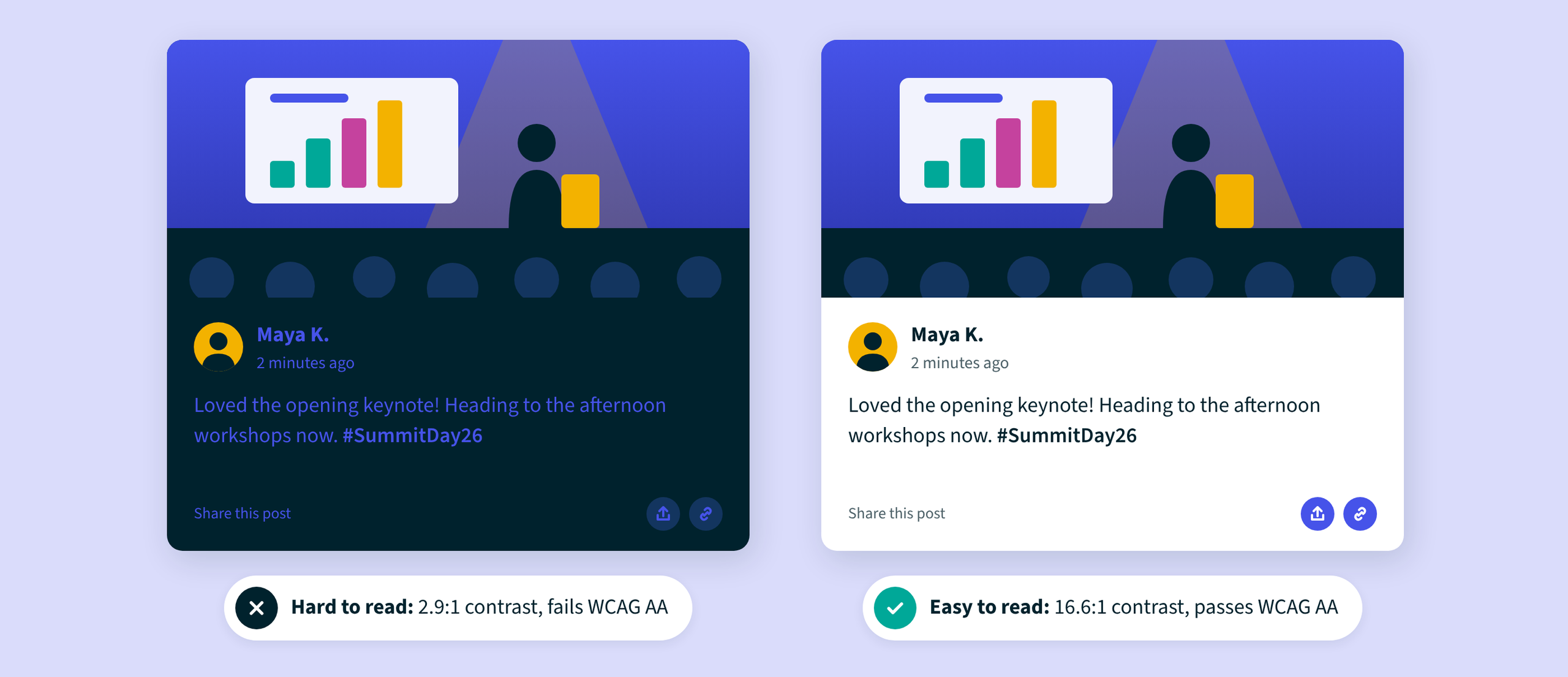
Text and interactive elements need sufficient contrast against their backgrounds to remain readable for people with low vision or color vision deficiencies.
Walls.io incorporates high-contrast design considerations to improve readability. When configuring a wall, organizations should also consider their brand colors, text styling, and any additional design customizations to ensure that the final experience remains accessible.
4. Accessibility-focused layouts and mode
Walls.io recommends its Fluid and Carousel layouts for enhanced accessibility as both layouts have been specifically optimized for WCAG 2.1 Level AA.
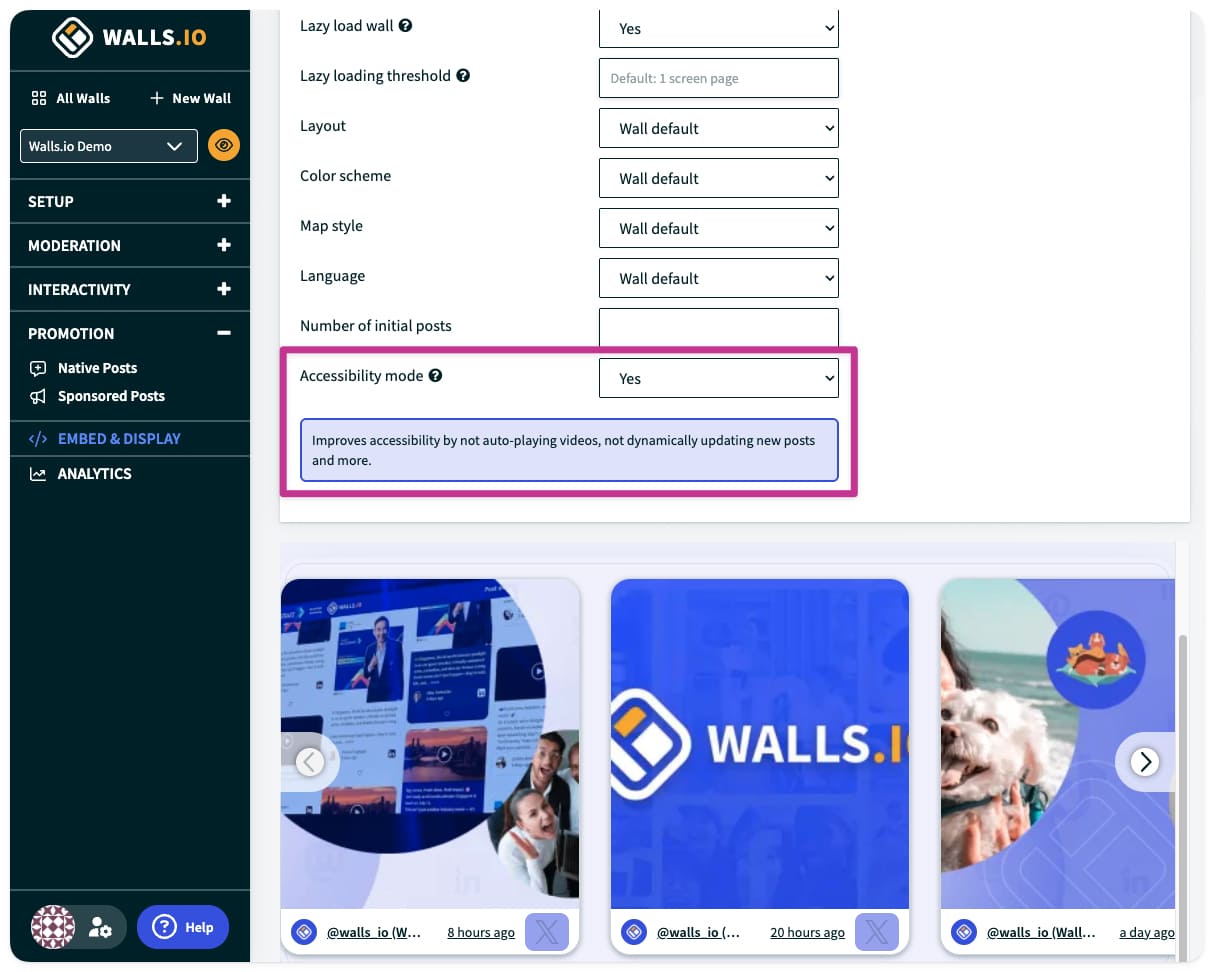
Organizations can also activate Accessibility Mode by turning on the feature in the backend. This mode disables certain dynamic features that can create a less predictable experience for assistive technology users, including autoplaying videos, dynamic post updates, and post shuffling.
The result is a more controlled browsing experience that prioritizes accessibility over constantly changing content.
5. AI image alt text
Alt text is the written description of an image that a screen reader reads aloud. It’s also the accessibility requirement social content fails most often, because almost nobody adds alt text when they post from their phone. Traditionally, adding alt text to a large volume of user-generated content requires someone to review images and write descriptions manually. That can be time consuming, especially for organizations running busy events or large-scale social campaigns.
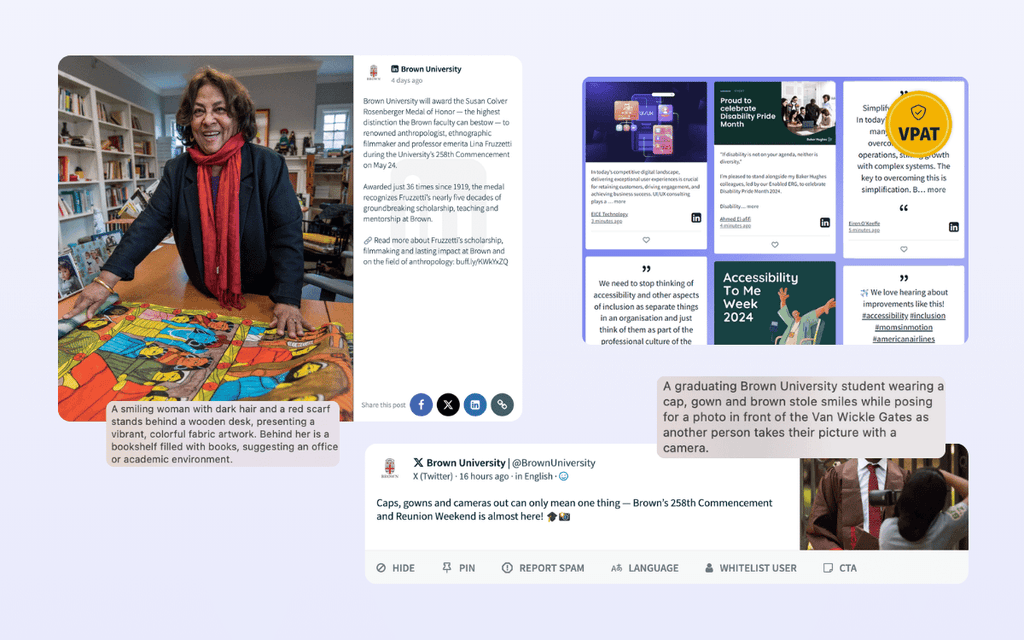
Walls.io addresses this challenge with AI-generated alt text, available as an enterprise feature. When images appear on your wall, AI writes the alt text automatically, so a photo from an attendee or a customer gets a description even when the person who posted it didn’t write one. While the AI alt text won’t catch every bit of context that a human would, like the name of a speaker on stage, for example, they do manage to turn a non-descriptive image into something that is readable – at a volume that no marketing team would be able to handle on their own. On a busy event wall that pulls in hundreds of posts an hour, that’s the difference between an accessible feed and an inaccessible one.
The Walls.io alt text feature is not just available to external viewers of the wall, it is also visible to your moderation team in the backend. The alt text displays for anyone moderating a post, ensuring that the social wall experience is inclusive not just to external audiences, but your team as well.
See how Walls.io’s accessibility and compliance compare to other social wall vendors.
VPAT documentation: Supporting accessibility reviews
For enterprise buyers, demonstrating accessibility can be just as important as implementing it. A Voluntary Product Accessibility Template (VPAT) is a standardized document used to communicate how a product addresses accessibility standards. It helps procurement teams, IT departments, and accessibility specialists evaluate a solution against WCAG criteria.
Walls.io provides VPAT documentation for its Fluid and Carousel layouts. Organizations can request the relevant documentation from the Walls.io enterprise sales team at support@walls.io.
This documentation can support vendor assessments and internal compliance processes. However, a VPAT is not itself a blanket guarantee that every implementation or piece of third-party content is accessible. Buyers should evaluate the relevant layout, embed configuration, and intended use case.
Websites are the obvious case. With a website embed, your social wall becomes part of your site, and it falls under the same accessibility standards as the rest of it the page. That’s why accessibility should be on the checklist whenever you add a social media feed to your website.
Events are the other big one. When a social wall is projected onto a big screen, accessibility matters in a slightly different way. Attendees may be viewing it from the back of a conference hall, from the side of an exhibition booth, or while moving through a busy venue. Small text, low color contrast, and rapidly changing content can make posts difficult to read or follow. Designing for accessibility means considering how the wall looks from a distance, choosing readable text and sufficient contrast, and avoiding unnecessary motion that could distract or overwhelm viewers.
In another example, an HR team embedding an employee advocacy feed on a careers page has to think about applicants who use assistive technology. A wall that works with a keyboard and a screen reader is part of being an inclusive employer in practice, not only in the job ad. We cover the event side of this in our guide to workplace accessibility at events.
An accessible social wall does more than display user-generated content. It helps more people participate in the stories, conversations, and experiences that make a community engaging.
With WCAG 2.1 Level AA-focused layouts, screen reader compatibility, keyboard navigation, optimized color contrast, AI-generated alt text, and available VPAT documentation, Walls.io gives organizations practical tools for improving social wall accessibility.
The most effective approach combines these built-in capabilities with thoughtful configuration and real-world testing. When accessibility is considered from the beginning, social walls can become a more inclusive part of your digital experience.
Ready to explore accessible social walls? Visit Walls.io’s accessibility features.
FAQ
Is Walls.io WCAG compliant?
Yes. Walls.io social walls conform to WCAG 2.1. The Fluid and Carousel layouts have been specifically optimized for WCAG 2.1 Level AA, and the platform includes accessibility features such as screen reader compatibility, keyboard navigation, and optimized color contrast for all layouts.
Does Walls.io support screen readers?
Yes. Every post on a Walls.io social wall is built so screen readers can interpret it correctly, which means screen reader users can move through the wall post by post. The whole wall can also be browsed and used with a keyboard alone, which matters for screen reader users and people with motor disabilities. Walls.io also offers AI-generated alt text for images as an enterprise feature, helping screen reader users access descriptions of visual content.
Is a VPAT available?
Yes. Walls.io provides Voluntary Product Accessibility Templates (VPATs) for Fluid and Carousel layouts. These documents describe how the layouts address WCAG 2.1 Level AA criteria. Contact the Walls.io Enterprise sales team at support@walls.io to request the relevant documentation.