
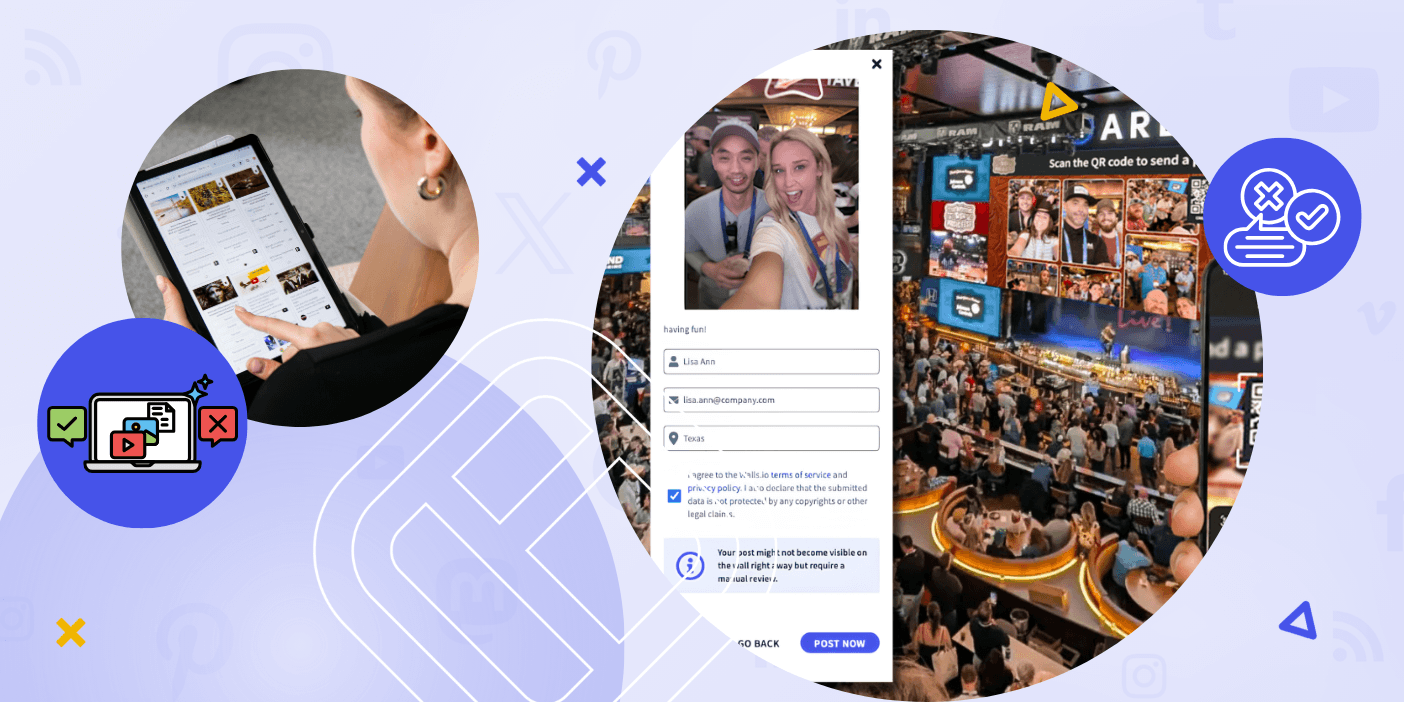

Public social displays serve as a potent tool for transforming audience involvement into immediate, observable engagement. With real-time UGC display at your events, activations or conferences, your brand can immediately leverage social proof, build trust and create a buzzing atmosphere.
However, there is a risk to take: What if undesirable content is displayed on the screens?
For marketers that plan events, brand managers, and communication teams this can feel like a complete show-stopper. A social wall without moderators opens you up to everything from unwanted spam, vulgar comments, and hashtagjacking to simply diluting your content.
Good thing is, with the right workflows, content filters, and platform functionalities, you can run entirely public social media experiences without fear. This guide will take you step by step through precisely what to do, from manually moderating content to using AI, and uses real-world examples from companies that have tackled this before.
Content moderation is the process of filtering, reviewing and controlling user generated content that’s displayed on your public display.
Moderation is a must for a social wall or digital signage, to display only relevant, appropriate and brand-safe posts from Instagram, Facebook, TikTok, LinkedIn or by direct submission via QR code.
It matters for three main reasons:
- Brand protection: Every time you speak or present, your brand is on full display, for everyone to see.
- Audience trust: People tend to engage more in environments that feel safe and curated
- Compliance: Many industries, like education, healthcare, finance require strict content control
Without moderation in place, you’re vulnerable to:
- Spam and off-topic content
- Offensive language or explicit images
- Hashtag hijacking (when outsiders co-opt your campaign hashtag)
- Negative or harmful messaging directed at your brand or attendees
A well-configured social media wall eliminates these risks while keeping the display dynamic and participatory.
Use Cases Where Content Moderation Is Non-Negotiable
Events and Conferences
Live events are the highest-visibility—and highest-risk—environment for social walls. Attendees post in real time using event hashtags, and any lapse in moderation shows up instantly on screen in front of hundreds or thousands of people.
At large-scale events like NAMM and Cisco Live, social walls run across giant screens, event apps, and hybrid broadcast feeds. Moderation isn’t optional—it’s a core part of the production setup.
Corporate Communications and Internal Events
Just like in public, the internal communications of any business also needs its share of control and governance. To enable better internal communication across 4,500 of their employees located in several places, Insperity, a PEO company, decided to go with a moderated social wall. While integrating feeds from all the popular social media platforms, they also allowed employees to submit their own content to the wall. This approach offered a more secured and controlled space, where all the employees can participate without fear.
Higher Education and Campus Displays
Most universities now put student-created content up on big screens in common spaces, libraries, and lecture halls. Case Western Reserve has a two-story social media feed in their student union displaying “life at CWRU.” Almost immediately after they launched, they discovered that enabling unmoderated social media auto-posting in a student environment is not a good idea and added moderation.
Retail and Public Digital Signage
In retail or public-facing spaces, audiences are broader and more diverse. The margin for error is smaller. A moderated https://blog.walls.io/events/event-hashtag-strategy-guide/ keeps displays engaging without introducing brand or legal risk.
Step 1: Set Clear Content Guidelines Before You Launch
Moderation starts before the first post is submitted.
- Define what content is allowed—and what isn’t
- Set expectations for tone, language, and visuals
- Share clear posting instructions: hashtags, submission links, rules, examples
When your audience knows what to post, the volume of problematic submissions drops significantly.
Step 2: Enable Manual Moderation for Full Control
Manual moderation means every post requires approval before it goes live on screen. It’s the safest setup for:
- High-profile public events
- Large-format displays in regulated environments
- Situations where a single bad post causes significant damage
Champlain College used manual moderation during graduation ceremonies to ensure that only appropriate content appeared on large screens in a family-facing environment.
Best practices for manual moderation:
- Assign a dedicated moderator (or small team) per event
- Monitor the approval queue in real time
- Approve posts quickly to maintain display energy
Step 3: Layer AI Moderation on Top of Human Review
Let’s be real, manual moderation really eats up a lot of time – especially when your audience starts booming. This is where AI Moderation to the rescue!
With Walls.io’s AI Moderation, you get spam filtering and sentiment analysis which automatically identifies and removes/flags unwanted content before it ever hits your approval queue. This means your human moderators get a clean feed of the most important content that needs their attention. That’s faster moderation and fewer tough calls.
How to use it effectively:
- Enable AI filtering as the first layer
- Use manual approval as the final gate
- Adjust filter sensitivity based on campaign and audience type
This hybrid approach balances speed and safety without sacrificing control.
Step 4: Control Your Content Sources
Not all source channels carry the same moderation risk. A broad keyword search on Twitter/X will pull in far more noise than a curated branded hashtag on LinkedIn.
Lower-risk source strategies:
- Use unique, branded hashtags only
- Limit feeds to specific verified profiles or accounts
- Avoid broad keyword searches for public-facing campaigns
Walls.io’s social media aggregation tools let you define exactly which sources feed your display—so you’re not pulling in content you didn’t plan for.
Step 5: Use Direct Posts for a Closed Submission Environment
For maximum control, let users submit content without going through public social media at all.
Direct Posts allow attendees to submit text, photos, or video directly to your social wall via a QR code or link—no social media account required. You retain full moderation control before anything goes live.
Why this works:
- No exposure to public social feed risks
- More inclusive (works for attendees without social accounts)
- Higher submission rates at events where people are hesitant to post publicly
S&P Global used Direct Posts during internal events to collect content safely while maintaining privacy compliance. Delta Electronics found that attendees actually preferred direct submission over public posting—and saw higher engagement as a result.
Step 6: Apply Keyword and Hashtag Filters
Block unwanted content proactively by filtering:
- Offensive or inappropriate language
- Competitor brand mentions
- Irrelevant hashtags and off-topic keywords
For big campaigns especially, hashtags can easily be abused and Walls.io has integrated filters to block keywords. By combining those filters with branded hashtag usage, hijacking risk can be minimized.
Step 7: Monitor in Real Time During Live Displays
Automation does the volume. Humans deal with the edge cases.
During live events, assign at least one person to:
- Watch incoming posts in the moderation queue
- Remove anything that slips through filters
- Actively highlight high-quality content
At high-traffic events like IPU assemblies, moderators actively curated content throughout sessions, not just setting filters and walking away.
Step 8: Educate Your Audience
The most overlooked moderation strategy is simply telling people what to post.
- Show examples of good posts on-screen before the wall goes live
- Display posting instructions and hashtags prominently
- Use QR codes and prompts to guide participation
When attendees understand what you’re looking for, content quality improves and the moderation queue gets much easier to manage.
Benefits and ROI of Proper Content Moderation
Higher Engagement
Safe, well-curated spaces make it easier for more people to get involved. People are more likely to post when they know the display is well-kept and their content will show up.
Insperity found that after they set up a moderated social wall for their distributed workforce, both onsite and virtual audiences were more engaged.
Stronger Brand Consistency
Only relevant, on-brand content reaches the screen. Messaging stays aligned across channels.
Leonardo, operating in the aerospace sector, uses Walls.io to ensure that employee-shared content is approved, appropriate, and consistent, maintaining brand standards across all public displays.
Increased Trust and Professionalism
A well-moderated social media display signals that your brand is in control. Audiences feel comfortable engaging. Stakeholders see a polished, curated experience—not a free-for-all.
Better Content Reuse
Moderated UGC doesn’t disappear after the event. Approved posts can be reused for:
- Marketing campaigns and social media
- Event recaps and highlight reels
- Website content and case studies
This turns live engagement into long-term content value.
Common Pitfalls and How to Avoid Them
Pitfall 1: Relying only on AI moderation.
AI filters are very effective, but they don’t consider the context. A post that passes a sentiment filter may still be inappropriate for your audience. It’s important to pair automation with human review.
Pitfall 2: Using broad or generic hashtags
Broad or generic hashtags invite spam and make hijacking easy. Use unique hashtags that include the brand name, and test them before the campaign launches.
Pitfall 3: There’s no assigned moderator.
If no one’s responsible for making sure everything goes smoothly, problems will go unnoticed. For every public display or live event, there must be a dedicated moderator. This is a rule that cannot be broken.
Pitfall 4: Handling internal events in the wrong way
People inside the company still create the wrong content. Use the same standards for moderating employee displays as you would for public displays.
Pitfall 5: Invisible posting guidelines
If attendees don’t know how to post or what is acceptable, they will guess. Make sure the instructions are easy to see on the screen and include them in your messages before the event.
Advanced Tips: Automation, Scaling, and Long-Term Management
Build Tiered Moderation Workflows
For large or ongoing campaigns, a single-layer approach won’t scale. Use a tiered system:
- Tier 1: AI filtering removes spam and obvious violations automatically
- Tier 2: Human review approves or rejects flagged and borderline posts
- Tier 3: Editors select featured or highlighted content for prominence
This keeps both safety and quality high as volume increases.
Automate Across Channels with APIs and Integrations
Walls.io’s API enables custom moderation workflows for enterprise use cases—syncing content across platforms, applying consistent rules at scale, and integrating with existing CMS or digital signage infrastructure.
Display the Same Curated Feed Everywhere
Once content is moderated, deploy it consistently across:
- Event screens and hybrid broadcast feeds
- Your website and landing pages
- Mobile apps and kiosks
- Permanent digital signage installations
This creates a unified, brand-safe content experience across every touchpoint.
Pair Moderation with Interactive Features
Structured engagement features naturally reduce moderation load. Polls, reactions, and photo booth integrations give attendees guided ways to participate—producing more predictable, on-brand content.
The NAMM Show, one of the world’s largest music industry trade events, used Walls.io social walls across multiple physical and digital locations.
Approach:
- Manual moderation enabled for all submitted content
- Balanced mix of attendee, exhibitor, and brand posts
- Scheduled posts for off-peak periods to maintain consistency
Results:
- Strong, sustained engagement before, during, and after the event
- High-quality, curated content across every display
- A consistent brand experience regardless of where attendees encountered the wall
Preventing inappropriate content isn’t about limiting participation—it’s about enabling confident, high-quality engagement.
When moderation is set up correctly, social walls become one of your most reliable event and marketing tools. You get authentic UGC, real-time audience participation, and full control over what your brand puts on screen.
The foundation is simple:
- Guidelines clearly set an expectation before the first post is even submitted
- Layered moderation tools for volume management without compromising safety
- Real-time oversight catches what automation misses
- Create thoughtful campaigns to mitigate risk from the start
Start with the right setup—and your social media display becomes something you look forward to running, not something you spend the event worrying about.
Ready to run a moderated social wall at your next event? Explore how Walls.io helps brands and event teams display live UGC safely and confidently.
FAQs
How do you stop inappropriate posts from appearing on a social wall? Use a combination of AI moderation filters, manual approval workflows, and keyword/hashtag filtering. This ensures only approved content appears on screen in real time.
Is manual moderation necessary for events? Yes—especially for large or public-facing events. Manual moderation gives you full control and prevents unexpected content from going live on screen.
What is the safest way to collect user-generated content for a display? Direct Posts are one of the safest options. They allow attendees submit content without using public social media, giving you complete control before anything is published.
Can social walls be used in regulated industries? Yes. Organizations like Leonardo use moderated social walls to ensure all displayed content is approved and compliant with industry standards.
How do you prevent hashtag hijacking? Use unique branded hashtags, apply keyword filters to block misuse, monitor content in real time, and combine hashtag campaigns with manual or AI-assisted moderation tools.
What’s the difference between AI moderation and manual moderation? AI moderation automatically filters spam and inappropriate content using rules and sentiment detection. Manual moderation requires a human to approve each post. The best approach combines both: AI handles volume, humans handle judgment calls.